Persia

Tuesday, 17 April 2018 in 15:42

Watch your team activity with Journal button!

Dear friends, we want to share great news ! We added special Journal button to the main menu. With this update, you will always be aware of everything that happens in your company account.

«Journal» is the quick access to your team’s actions history in the system.

Here account administrator can track information about:

  • new jobs creation;
  • new resumes adding;
  • changes and edits in resume;
  • attaching new files to resume;
  • changes in skills and categories lists;
  • comments to the resume that recruiters and customers left;
  • stages to which the candidate was moved;
  • interviews appointment;
  • new tasks in the scheduler and their status;
  • changes in the calendar.

For your convenience, this information can be sorted by date, recruiter and customer.

Recruiter connected to your account  can view his own activity in the system with the journal:

  • quickly find recently added resumes;
  • track the changes in resume that other recruiters made;
  • view added jobs;
  • track tasks in the scheduler and calendar.

We remind you that the most important information you can always learn with Notification button.

Here, the following actions will be displayed:

  • new comments adding;
  • invitations for interview;
  • interview deleting;
  • event adding, deleting, or editing;
  • job changing;
  • customer appointment to the job.

With the help of this new PersiaHR feature you will be aware of everything that happens in your company’s account, and you will be able to track the efficiency of the whole team!
Categories: HR, Persia, рекрутинг

Friday, 12 January 2018 in 10:28

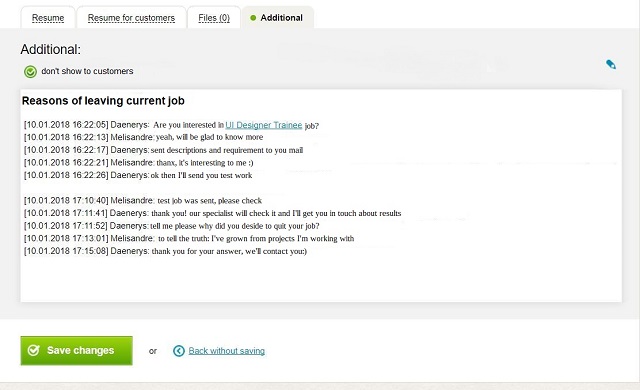
+3 useful additions in Applicant’s card

Recruiters often use a notebook and pen at interviews to briefly write down candidate’s answers. But if records were made hastily, it’s easy to get confused in them especially when you have to work with a large number of applicants. PersiaHR will help to avoid embarrassing situations!

To make a note go to the applicant’s card, then go to editing mode and open Additional tab. Here you can see a field for entries where you can write a note or comment, save the history of correspondence from the messenger, enter questionnaire answers and specify any other important information. After you have created the note, click Save Changes button. Additional tab will now be highlighted in green. At any time, this information can be edited.

!Please note that by default your notes will not be visible to customers, but you can make them visible. To do this, remove the check mark in the corresponding field 

Filter comments by jobs

Surely, you are familiar with situation when one candidate is considered for several similar positions. In PersiaHR you can link one resume to several jobs. In applicant’s card on the left you can see comments to the resume that you, your colleagues and customers have left. Now this information can be filtered by job. To do this, use the drop-down list of jobs in Comments field.

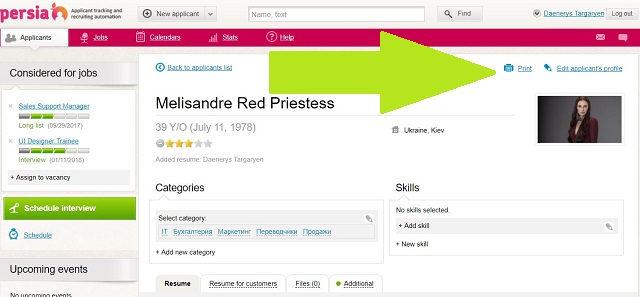
Print the complete Applicant’s card (finalized)

We have improved the ability to print applicant’s card. Now the paper version will include contact information, lists of skills and categories, as well as the resume text. To do this, you need to use Print button in the upper right corner.  

We are sure that new additions will you help to preserve the necessary and, if necessary, navigate the information. And if you know how to make our system even more convenient we will be happy to know about your ideas!

clients@PersiaHR.com
+38 044 384 20 05 
Skype: persiahr

Categories: Persia

Tuesday, 11 April 2017 in 17:35

Efficient recruiters choose task scheduler in Persia!

Roman commander Gaius Julius Caesar could do several things at the same time, but this is nothing compared to a recruiter who hunt for candidates for several vacancies at once. Recruiter had to call one candidate, write to another, review feedback from job sites, schedule an interview, show resumes to a customer, etc. We know how important and valuable your time is, therefore we added a scheduler to Persia.

How does it work?

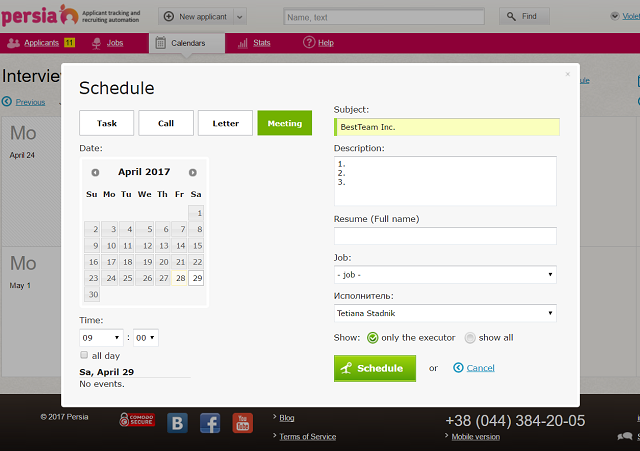
To schedule a task, you need to go to Calendar, in the right upper corner click Schedule, and scheduler window will open. Choose an action: it can be Task, Call, Letter or Meeting. Then specify date and time. In the same window you will see if you have other events scheduled for this day — this will help you to avoid overlapping.

Next, mark the task with the obligatory Subject field. For example, if you have appointed a meeting with the customer, you can write in the topic for what reason. Below in field Description you can write down the questions you need to ask the client. You can also attach resume or vacancy to the task.

For example if you’re going to give a feedback to candidate by phone, you can schedule a Call, specify topic, write briefly what you want to tell him, in the column Jobs select necessary one, and in the Resume line enter candidate’s surname. The system will offer you resume options from your candidate database, and you only need to select the required one.

Here you can also specify the Contractor — it can be one of the recruiters connected to account: just select it from the list. In addition, task can be hidden from other users or made visible. To do this, check corresponding box.

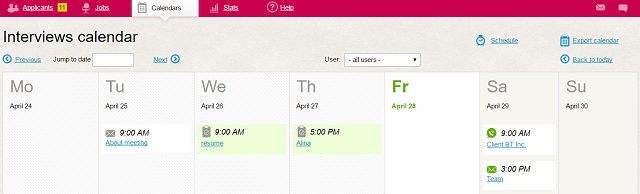
After all the information is filled, click the Schedule button, and task will be displayed in your calendar.

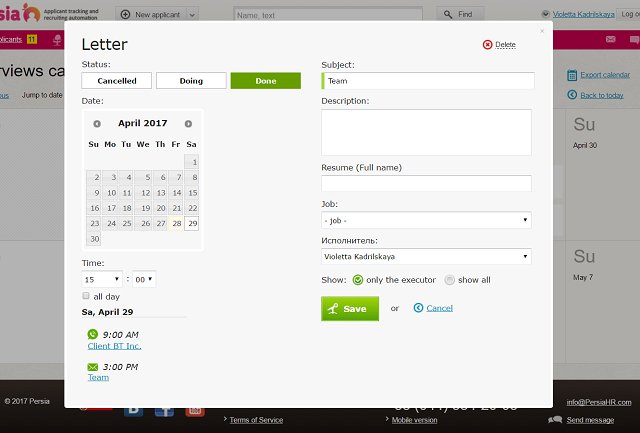
If you have appointed the person responsible for task, this person will receive notification in Persia. In the future, the contractor will be able to mark task stage, and you would track it. To do this, click on the corresponding task in your calendar, and pop-up window will display information about task stage.

In order that you do not need to check the calendar every time and view the upcoming tasks, the list of the nearest scheduled tasks will be displayed on the left of your account main page. Also, if you are on the candidate’s card page, there you can see tasks related to this candidate.

We are sure that Persia task scheduler will be your indispensable assistant in the effective time management!

Categories: Persia